When you have to share a screen shot with a client, co-worker or support group, every minute of tedious software is a minute of work. If you are working on a project and need to go to a desktop application, save a PNG to your messy desktop, then go to a web storage host, upload the file and then copy a shareable link, then you are wasting precious production time.
Snipboard.io fixes this exact friction point.
You don’t need to download a “Snipboard” browser extension or an additional large application with a complex user interface to install on your operating system to use Snipboard.io. This makes your system’s built-in “clipboard” a direct URL-publishing tool and all that is required to turn a simple screen shot into a lightweight (and shareable) URL is two or three keystrokes.
1. The Core Workflow: Clipboard-to-Web Architecture
The standout feature of Snipboard.io is its minimalist design. It is built entirely around speed, bypassing the standard “Save As” file selection screens that break up modern workspaces.
[Print Screen / Cmd+Shift+4] —> Saves Image to Local Clipboard
|
v
Navigate to Snipboard.io
|
v
[Ctrl + V / Cmd + V] ————–> Fast Cloud Upload
|
v
[Instantly Shared Link]
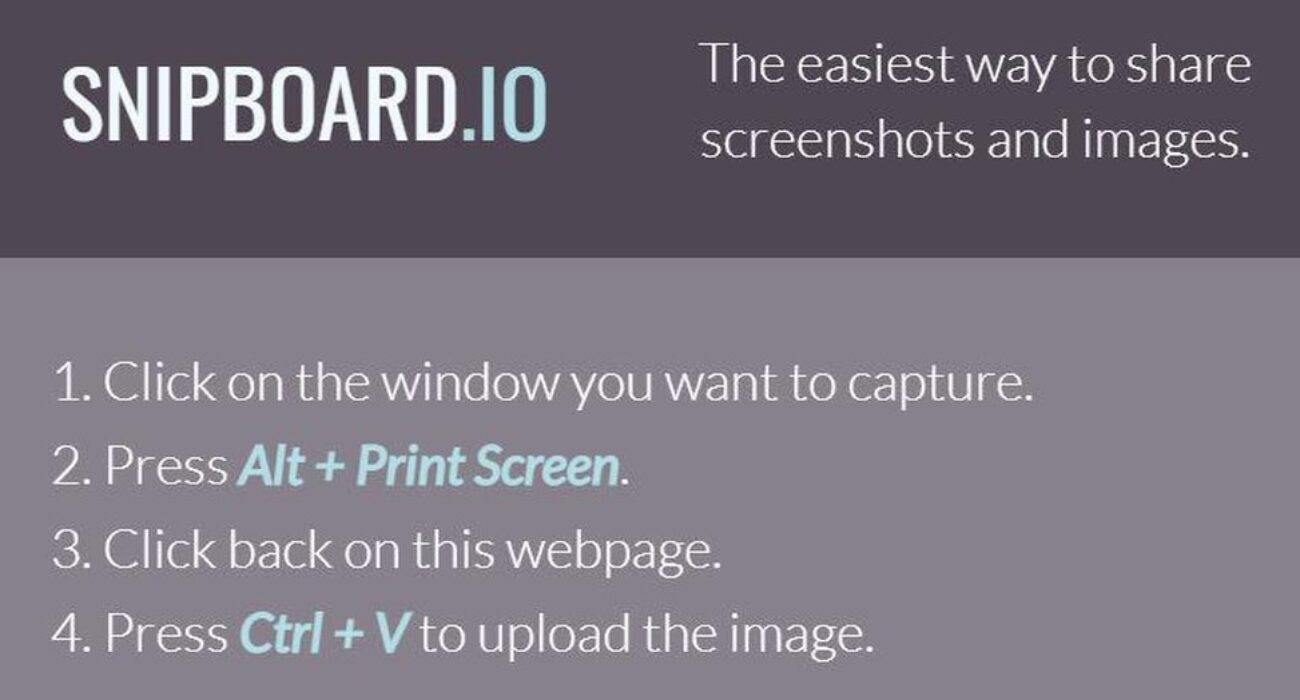
The day-to-day workflow requires only three steps:
- Capture: Hit your standard system shortcut (like PrtScn on Windows or Cmd + Shift + 4 on Mac) to copy your current view directly to your clipboard.
- Paste: Browse to Snipboard.io and press Ctrl + V (or Cmd + V).
- Share: The site instantly processes the image data and generates a clean, short URL ready to paste into emails, Slack channels, or support tickets.
2. Key Features and Built-In Editing Tools
While Snipboard.io is built for speed, it includes essential production tools to help you clean up and protect your visual data before sending it out.
Built-In Inline Editor
After pasting an image into the dashboard, no need to jump into Photoshop or MS Paint to make any changes. The interface offers a number of basic markup features that enable you to crop the edges of a border, draw simple vector shapes or add text callouts, or draw arrows to direct the viewer’s attention to a specific bug or data point.
Account Management Dashboard
While you can use the service completely anonymously for quick one-off transfers, registering a tier account opens a history dashboard. This central management page lets you track every link you’ve generated, monitor view counts, and manually delete old images that contain outdated project details.
Direct API Integrations
For developers, QA teams, and automated testing setups, the platform provides a clean, well-documented public API. This allow engineering teams to pipe automated system error screenshots or web-view snapshots straight to Snipboard’s cloud hosting, generating instant external URLs without building a custom storage backend.
3. Plan Structures and Core Pricing
Snipboard operates on a straightforward freemium model, separating casual sharing from professional, high-volume production pipelines.
| Feature / Metric | Free Anonymous Tier | Snipboard Pro Plan |
| Monthly Cost | $0 (No account needed) | $4.00 / month (Per User) |
| Ad Experience | Standard ad-supported layout | 100% Ad-Free interface |
| Image Expiration | Deleted after period of inactivity | Permanent hosting (No expiration) |
| Resolution Limits | Standard compressed resolution | Premium, uncompressed high-res |
| Management Tools | None (Individual browser tracking) | Complete deletion & history dashboard |
| Developer Access | Restricted API thresholds | Full Public API & high-volume tokens |
4. Real-World Trade-Offs: Is It Right for Your Team?
Choosing the right productivity tool means looking closely at how its design matches your daily workload.
The Pros
- Zero System Bloat: Because it runs entirely inside the browser, it requires no local installation, zero background updates, and zero administrative permissions on enterprise work computers.
- Peak Keypress Efficiency: It is designed specifically for power users, stripping away the multi-click friction of typical cloud storage apps.
- Low Financial Barrier: At just $4.00 a month for the Pro tier, it offers a highly affordable option for professional freelancers and small design teams.
The Cons
- No Native Video Capture: The platform focuses strictly on static website screenshots and static images; it cannot record live video clips, GIFs, or system audio.
- Manual Data Masking: The simple editor doesn’t contain an automated blur equipment to hide sensitive text. If your screen contains hidden API keys, passwords, or personal client data, you must manually crop or black out those zones using the brush tool before finalizing the upload.
- Browser Dependency: If your internet connection drops or your browser encounters a heavy script crash, you lose your active editing canvas until the page reloads.
Frequently Asked Questions
Do my shared images stay online forever on the free tier?
No. To prevent server bloat, images uploaded anonymously on the free tier are subject to automated cleanup protocols if they do not receive active traffic over a set period. If you need guaranteed permanent hosting for system documentation or long-term training guides, upgrading to the Snipboard Pro tier ensures your uploads never expire.
Can I paste multiple images simultaneously onto the board?
Snipboard.io is optimized for rapid, sequential single-image processing. For multi-image galleries or complex multi-step visual layouts, users should paste and generate links individually, or utilize a local folder sync tool before pushing a batch to the web.
Is Snipboard.io safe for sensitive company data?
The tool employs the industry standard encryption for data in-transit while the data is being pasted up and uploaded. But, since public facing links will post freely and can be shared anywhere on the web, enterprise users should always be vigilant about data hygiene, and ensure that proprietary source code, private user metrics, or credentials are entirely hidden from view before linking with the built-in crop and draw tools.